

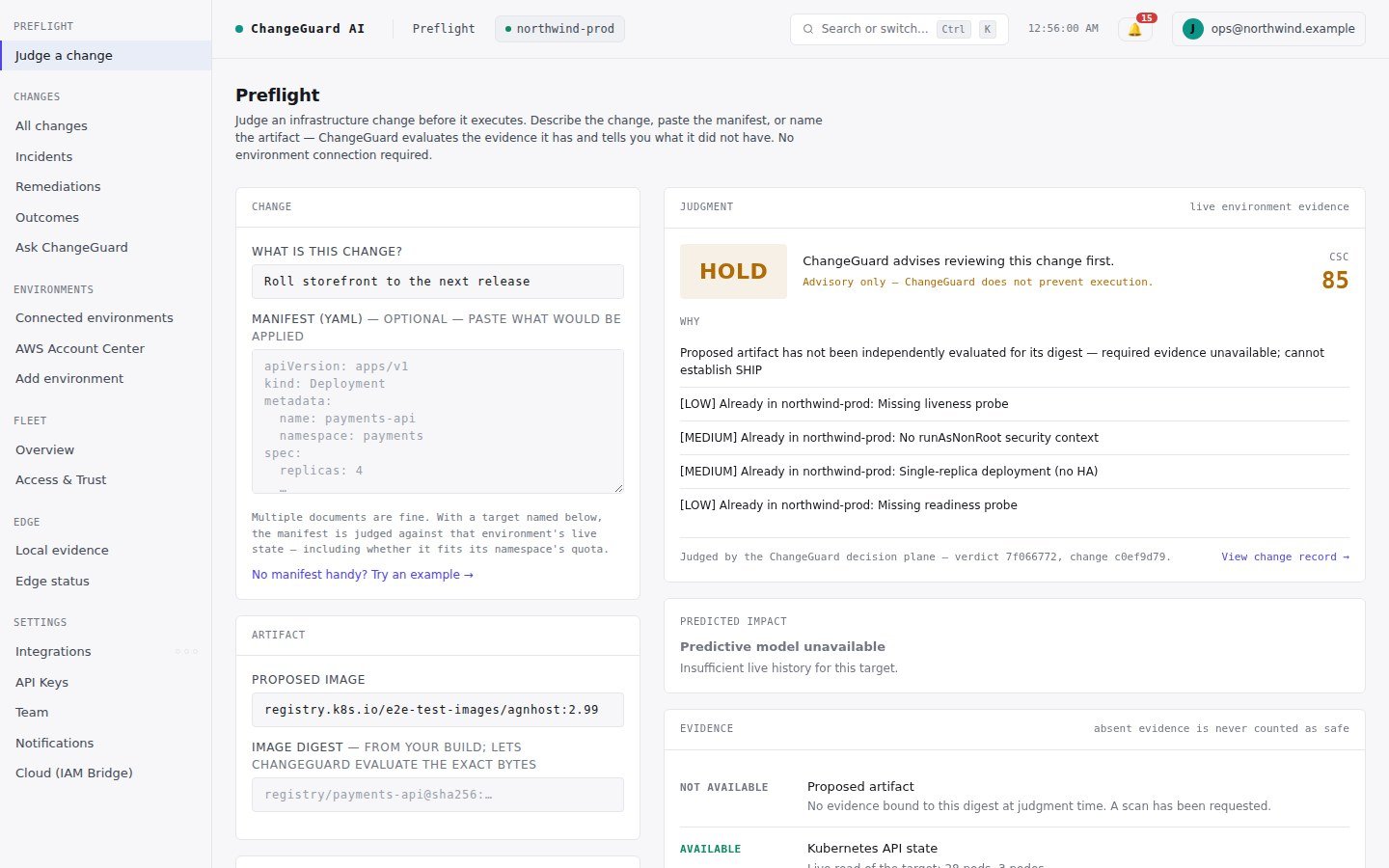
A real verdict: a proposed change judged against a live environment, with the reasons, the evidence it had — and the evidence it did not have.
The vocabulary you need (and nothing else)
You do not need to know Kubernetes internals, how evidence is collected, or any internal identifier to read a verdict. Those details exist, and are documented further down, but the first-use path never requires them.
Where you are going
1
Run your first Preflight
A verdict in about two minutes, with nothing connected. Step 2
2
Understand SHIP / HOLD / BLOCK
What each verdict means and why HOLD is the honest default. Step 3
3
Connect an environment
Live context for every judgment, read-only. Step 4
4
Connect GitHub
A verdict on every pull request — nothing to paste. Step 5
5
Judge a real proposed change
Open a pull request and watch it get judged. Step 6
6
Observe the outcome
What actually happened, written into the same record. Step 7
7
Understand the Change record
One change, one permanent address. Step 8
8
Optional: enable execution
Let ChangeGuard AI apply approved fixes through the Cloud Executor — under a Permit. Step 9
9
Optional: choose Advise or Auto
Decide how much authority it gets, per environment. Step 10