

What happens without execution enabled
ChangeGuard AI still detects incidents (Changes → Incidents: every failing workload, attributed to the change that shipped it), explains them, and proposes a fix with the exact patch. It just cannot apply anything. Many teams run this way for a while.Enabling the Cloud Executor (preferred)
1
Choose the namespaces
Click Set up Cloud Executor and name the namespaces ChangeGuard may act in — for example
shop, payments. kube-* namespaces are never granted.2
Create the execution role in your AWS account
ChangeGuard generates an IAM role for this environment —
ChangeGuardExecutor-<environment-instance> — with no AWS permissions and a trust policy that admits only ChangeGuard’s Cloud Executor with your external ID. CloudFormation, Terraform and CLI forms are provided; nothing is typed by hand.3
Let the role reach this cluster, and grant the namespaces
One generated EKS access entry maps the role to this environment’s own Kubernetes group, and one generated RBAC file grants that group
get, list and patch on Deployments, StatefulSets and DaemonSets in exactly the namespaces you chose. You apply both with your own credentials — applying them is the grant. Nothing in ChangeGuard AI can give itself write access.4
Verify execution access
Click Verify execution access. Within about a minute the panel reads Cloud Executor Ready and lists every check: ChangeGuard’s own (signing, the execution role, the cluster identity, the Executor reachable) and the Executor’s (assume the role, authenticate to exactly this cluster, hold the required verbs in your namespaces, hold none of the forbidden ones, verify a signed probe Permit). No workload is read or changed by this check.
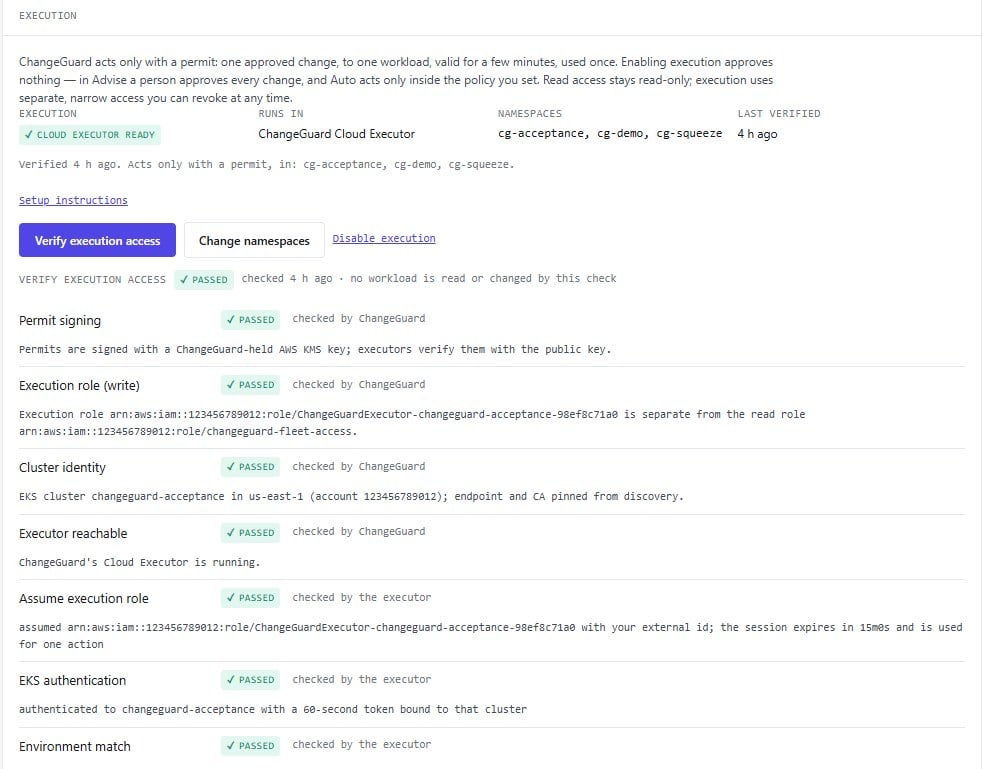
Execution verified: the Cloud Executor can act in the chosen namespaces — and is denied delete, create, exec, secrets, impersonation, RBAC writes and cluster-admin.
What the Executor may do
- Act only with a consumed Permit — one approved change, one workload, minutes, once. Enabling execution approves nothing.
- Only
get,listandpatchon the workloads in the namespaces you chose. No cluster-admin, no wildcards, no secrets, nodelete, nocreate, nopods/exec. - Apply only fixes ChangeGuard AI proposed and that were approved by a person (Advise) or allowed by your policy (Auto) — step 10.
- Every applied fix is verified against fresh evidence before it is called successful, and every record keeps its approver, its policy version and its Permit.