

Connecting an environment is a Professional capability (and part of the design-partner program); the trial marks the Fleet surfaces with a Pro tag and explains the gate when you open them. Preflight and GitHub pull-request verdicts do not require it.
The default: connect centrally (Fleet)
Open Environments → Add environment and choose AWS / EKS. (You can also start from Environments → AWS Account Center → Add AWS account — that is where every connected AWS account and its health lives afterwards; see AWS Account Center.) The flow walks the steps in order:1
Authorize AWS
Give the account a label, create the IAM role from the trust policy the page shows you, and paste its ARN — the role ChangeGuard will assume. The role can only list and describe EKS clusters, and only ChangeGuard AI’s principal with your unique external ID can assume it. Choose the regions to search and continue.
2
Discover your clusters
ChangeGuard AI lists the EKS clusters it can see in those regions. Discovery registers nothing.
3
Select and authorize
Choose which clusters it may observe. Nothing is read until you say so.
4
Grant cluster read access
ChangeGuard AI generates the exact read-only authorization for the clusters you selected; you run it with your own credentials. Cluster access is a grant you make and can revoke — removing it cuts ChangeGuard AI off within about a minute.
5
Verify
Within about a minute the environment reads Ready in Environments → Connected environments, with its evidence source (Fleet), its judgment readiness and its live counts; it also appears in the header switcher and in Fleet → Overview. Back in Preflight, the Target now reads judged against this environment’s live state.
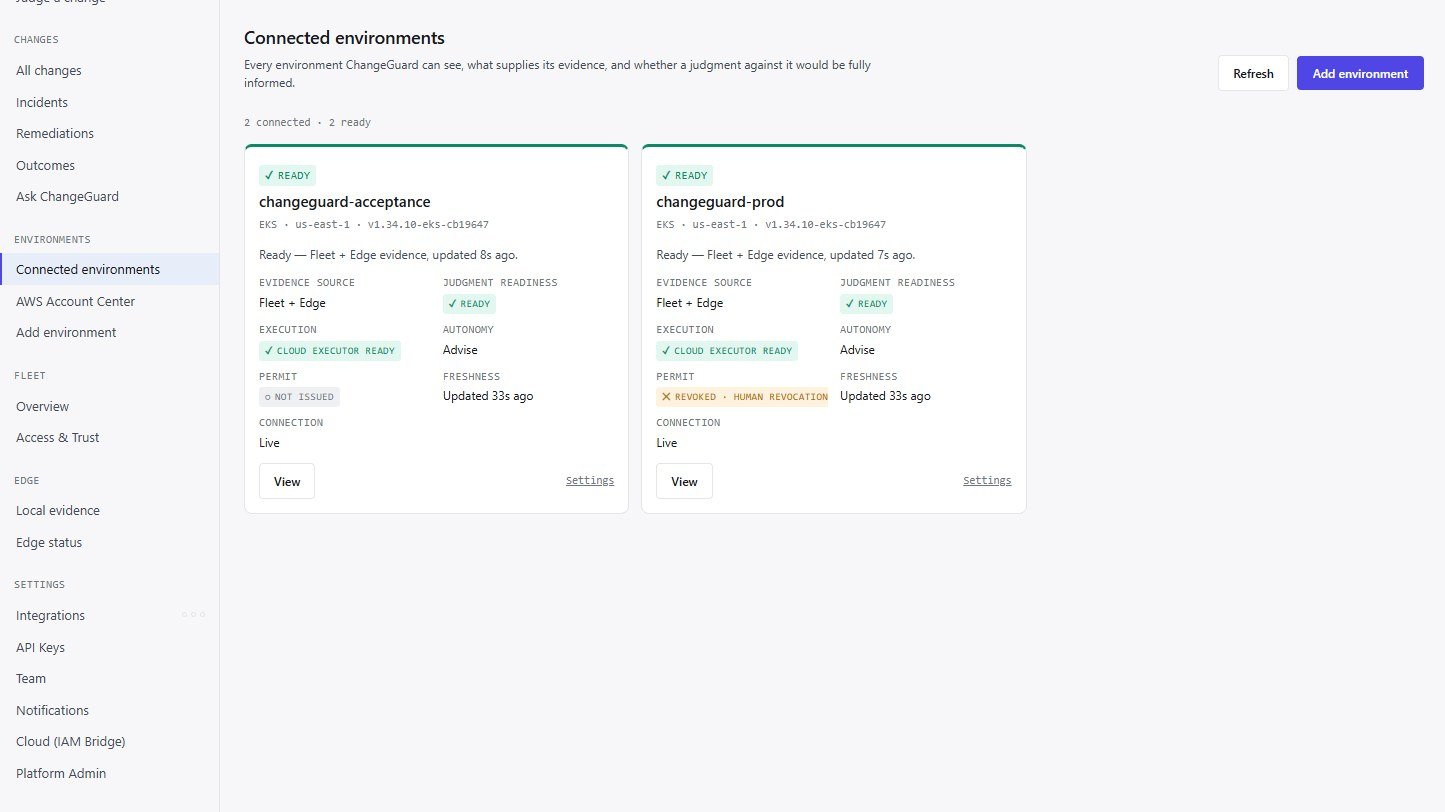
Connected environments after connecting: status, evidence source, judgment readiness, execution readiness, the latest Permit and the mode — per environment.
Where evidence must stay local: Edge
Most environments do not need anything installed: Fleet reads Kubernetes API state (workloads, pods, nodes, events, quotas, RBAC) and executed image digests centrally. Edge is a small read-only collector you install only where a capability genuinely depends on local presence — runtime activity (Falco), node benchmark checks (kube-bench), Argo CD / Flux controller state, or an API endpoint ChangeGuard AI has no network path to. The Edge → Local evidence page lists exactly which evidence classes need it, so you can decide per environment. Edge supplies evidence only; it is never required for judgment or for execution. Install steps: Install ChangeGuard Edge.Connecting is not the same as acting
Everything on this page is read-only. Letting ChangeGuard AI apply a fix is a separate, optional step with a separate per-environment identity and a short-lived Permit — step 9. Nothing you do here grants write access.Check it worked
- Environments → Connected environments shows the environment as Ready, evidence source Fleet, judgment readiness Ready.
- Preflight’s Target shows the environment and judged against this environment’s live state.
- A judgment’s Evidence card shows Kubernetes API state — AVAILABLE — Live read of the target: N pods, N nodes.
- Changes → Remediations shows the environment panel: Evidence — read-only: Fleet Connected (or Edge Connected).