

Status: Live-proven. Permit-governed execution runs in production, is exercised end to end by the daily live acceptance journey, and is pinned by a blocking safety matrix in every build. See Testing and assurance.
A Permit is not an API key, an environment unlock, a session, a standing grant, a broad write permission or a blanket AI permission. It authorizes one change, to one workload, in one environment, through one Executor, for minutes, once.
Why it exists
Judgment and authority are different things. A SHIP verdict says what ChangeGuard believes about a proposed change; it authorizes nothing. An approval or a policy says what is authorized — and the Permit is how that authority reaches the Executor without becoming standing access.
Keeping the four apart is what lets ChangeGuard be autonomous-capable by design and human-controlled by default: it is not safe because it lacks power, it is safe because authority is governed.
The lifecycle
1
Propose
A fix is proposed — by ChangeGuard’s analysis, an agent, or an operator. The proposer is recorded from the session; it is never client-supplied.
2
Judge
The proposed action is checked against a server-side allowlist of safe operational fields. An ambiguous or out-of-allowlist action can never be approved.
3
Authorize
In Advise, a signed-in operator approves (API keys cannot). In Auto, an explicit, non-empty environment policy with an id and a version allows it. Either way the authorization binds the canonical action hash.
4
Issue the Permit
ChangeGuard signs a compact token (ES256) with a key held in AWS KMS. The private key never leaves KMS. Executors fetch the public keys from
GET /api/permits/keys.5
Execute
The Executor verifies the Permit offline, then consumes it online with ChangeGuard — exactly once, before any AWS or Kubernetes call. Only a successful consume lets it mint credentials, record the pre-state, and apply exactly the signed patch.
6
Observe, attribute, verify
The outcome is reported under the Permit id and the attempt id — never correlated by recency. VERIFIED requires a fresh observation of the environment at least 90 seconds after the action, showing the permitted state, healthy.
How approval and policy relate to it
- Advise is the default. No approval → no authorization → no Permit. Only a signed-in operator, admin or owner can approve a cluster write; an API key is refused (
human_authorization_required). - Auto issues a Permit only under an explicit policy — namespaces, fix types, a confidence floor, an hourly cap — with a policy id and version. An empty or default policy fails closed. Outside the policy, the change waits for a human, exactly as in Advise.
- Authority is bound to the exact action. The authorization records the canonical action hash. If the proposal changes materially afterwards — patch, target, environment or kind — authority is withdrawn (
proposal_changed) and a new approval and a new Permit are required. - A policy edit bumps the policy version and revokes every Permit issued under the old one (
policy_changed). A change already consumed under the old version is past the commit point and completes under the authority it had; a change not yet consumed returns to a human. It is never re-authorized silently.
How the Executor consumes it
Offline validity is necessary and never sufficient. An Executor first verifies the token offline — signature, issuer, audience, lifetime, its own executor binding, the environment, and the action’s own hash. But a revoked or already-used Permit still verifies offline, which is exactly why offline validity is not the authority to write. The authority is online. Before any AWS or Kubernetes call, the Executor must consume the Permit with ChangeGuard, and consume is the single, atomic commit point of one execution attempt. At consume, ChangeGuard checks, in order:- the Permit row exists for this tenant, is still
issued(not revoked, expired or consumed), and is not past its expiry; - the Executor presents the SHA-256 of the exact token it verified — anything but the token ChangeGuard issued under that id is refused, even one validly signed with ChangeGuard’s own key;
- the stored token still verifies with ChangeGuard’s current keys and the Executor’s binding (tenant, location, executor id, use, audience, action hash);
- the authority still holds, re-derived now — still approved, the proposal re-hashed equals the authorized hash, and for Auto the environment is still in Auto under the same policy id and version;
- the execution path still holds, re-derived now — signing available, execution enabled for this location, verified within 24 hours, the namespace granted, and for the Cloud Executor the cluster identity and execution role equal the ones signed;
- one transaction moves the Permit from
issuedtoconsumedwith the attempt id recorded, and the change fromapprovedtoapplying.
200 does the Executor mint AWS credentials or touch the cluster.
Expiry, single use, revocation
Expiry
Expiry
The expiry is signed into the token and repeated in the database with a check constraint (never more than 15 minutes after issue). Consume refuses a Permit at or after its expiry. A lapsed Permit is marked
expired; issuing a new Permit for the same change expires the lapsed one in the same transaction.Single use
Single use
Single use is a database fact: an atomic update from
issued to consumed together with the change moving to applying. A second attempt is refused as a replay; the same attempt re-delivering its claim is idempotent. Concurrent consumes yield exactly one winner. Executors also keep a local replay cache. A consume that never got an answer releases the local claim so the next poll retries as a new attempt, which ChangeGuard refuses if the first one had landed. Retries after a consume are explicit: a new change, a new authorization, a new Permit.Revocation
Revocation
Revocation takes effect immediately, up to the commit point. A human revocation, a withdrawn approval, a material proposal change, a policy edit or an execution-path change that lands before consume makes the consume fail and revokes the Permit. Revocation and consume race on the same row lock; exactly one wins. After consume, the attempt holds the Permit — stopping an action already in flight is done with your own levers (delete the access entry, the RoleBinding or the role), and is visible as its outcome. Revocation reasons are a closed set, signed into history and never rewritten:
human_revocation, policy_changed, environment_retired, target_identity_changed, proposal_changed, approval_withdrawn, security_event, execution_disabled. Revoking a Permit also withdraws the authorization and returns the change to awaiting approval. Operators revoke one Permit from the environment’s Execution section or the change record; an admin can revoke every live Permit at once as a security event.Immutability
Immutability
A database trigger forbids changing any signed field. Status only moves out of
issued. The outcome is written once. Permit events are append-only.Fail closed
Fail closed
If no signing key is available, no Permit is issued and nothing executes. The approval stands, and the product reads Permits unavailable. If the consume store is unavailable, consume answers
503, nothing is spent, and the Executor retries later as a new attempt.Environment binding and action binding
The Permit signs the environment’s identity, not just its name. For the Cloud Executor that means the EKS cluster, account and region plus the endpoint and the certificate authority pinned at discovery: a swapped endpoint never reaches AWS, and a Permit for environment A is refused by the Executor serving environment B. Execution identity is itself per environment — the execution role, the Kubernetes group and the RBAC names all carry the environment’s instance — so two environments on one physical cluster never share write authority. See Environment isolation. The action is bound by its canonical form — sorted keys, no insignificant whitespace, no ambiguity — and its hash. The issuer and the Executor are pinned to the same golden vectors, so a third-party Executor can test its implementation against them. The Executor applies only the signed bytes: a strategic-merge patch, with the field managerchangeguard-executor, read back after writing.
What you see in the product
Every environment shows its latest Permit — Not issued, Authorized · expires in 8m, Consumed · Verified (or Execution started, Action applied, Verifying, Failed, Rolled back), Expired, or Revoked · reason — and every change record shows the Permit that governed it. With the Cloud Executor the Permit id is also the AWS session name in your own CloudTrail and EKS audit log.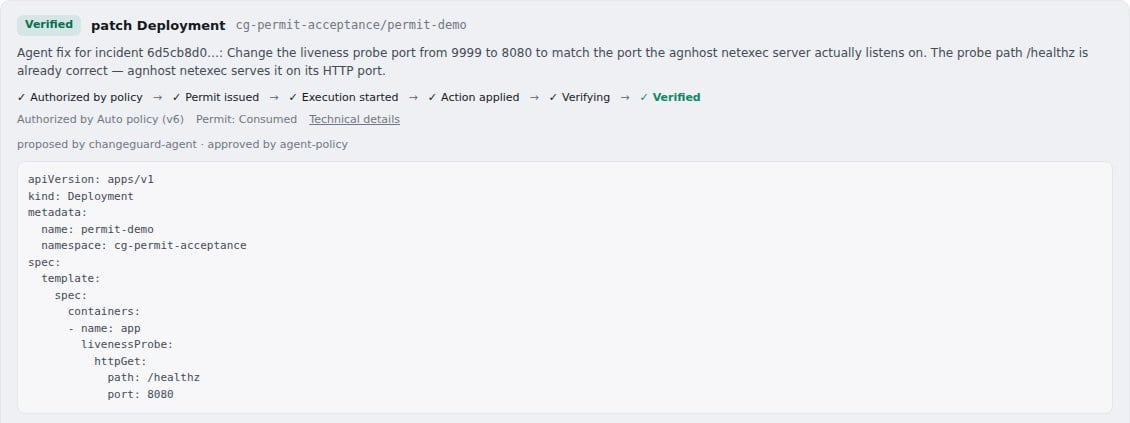
A verified remediation and its state ladder: authorized by policy → Permit issued → execution started → action applied → verifying → VERIFIED. The Permit was consumed exactly once.
Related
Advise and Auto
How authority is granted per environment, and what each mode may do.
Cloud Executor
The preferred Executor: nothing to install, a role with no AWS permissions, one patch per Permit.
Local Executor
The same Permit model from inside your cluster, where topology or policy requires it.
Permit security
Signing, key rotation, single use and replay, proven by tests.