> ## Documentation Index
> Fetch the complete documentation index at: https://docs.changeguard.ai/llms.txt
> Use this file to discover all available pages before exploring further.
# 1. What ChangeGuard AI does
> One judgment, before and after every production change — and the ten steps from a blank account to a verdict on your own pull requests.
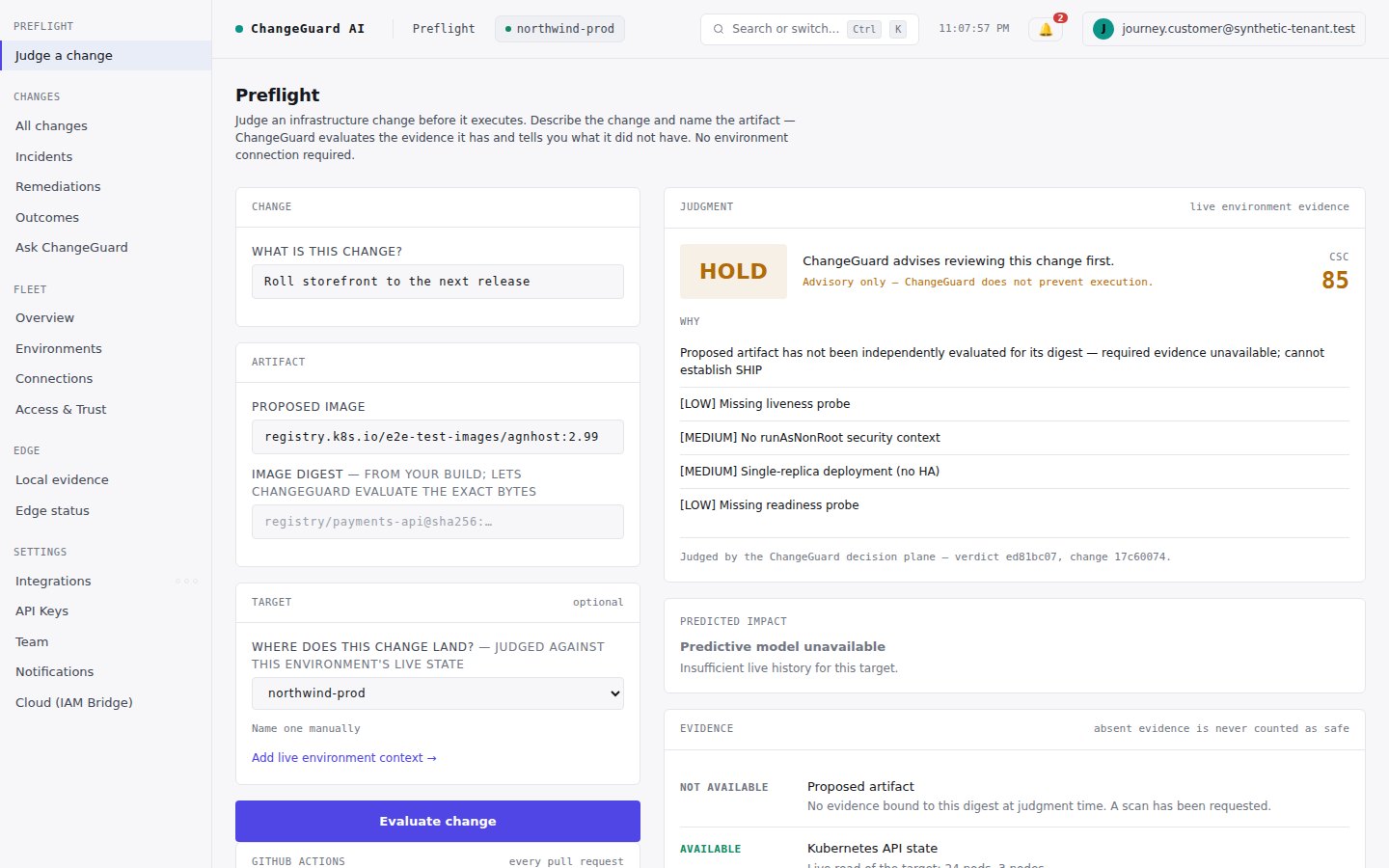
ChangeGuard AI is the **independent judgment layer for production changes**. Before a change ships, it judges the proposed change against the environment it will actually enter and answers **SHIP**, **HOLD** or **BLOCK** with the reasons in plain terms. After the change deploys, it observes what actually happened and writes that into the same record. If something goes wrong, it proposes the fix within the authority you grant. Everything is kept, permanently, on one record per change.
```text theme={null}
PROPOSED CHANGE → ENVIRONMENT → CHANGEGUARD JUDGMENT → SHIP / HOLD / BLOCK
→ DEPLOYMENT → OBSERVED OUTCOME → REMEDIATION IF NEEDED → PERMANENT CHANGE HISTORY
```
 ## The vocabulary you need (and nothing else)
| Word | What it means in ChangeGuard AI |
| ------------------- | -------------------------------------------------------------------------------------------------------------------------------------------------- |
| **Environment** | The place a change will land — a cluster ChangeGuard AI is watching, read-only. |
| **Proposed change** | What is about to happen: a description, an artifact (image), or the actual manifest. |
| **Evidence** | What the judgment had to work with: the live environment, the artifact, prior history. Every verdict lists what it had *and what it did not have*. |
| **Verdict** | SHIP, HOLD or BLOCK, with reasons. Advisory by default — ChangeGuard AI does not prevent execution itself. |
| **What happened** | The observed outcome after a deploy, recorded against the same change. |
| **Remediation** | A proposed fix when something goes wrong; a person approves it (Advise) or a policy allows it (Auto). |
| **History** | Every change, its verdict, its outcome and what was done about it — append-only. |
You do not need to know Kubernetes internals, how evidence is collected, or any internal identifier to read a verdict. Those details exist, and are documented further down, but the first-use path never requires them.
## Where you are going
A verdict in about two minutes, with nothing connected. [Step 2](/start-here/first-preflight)
What each verdict means and why HOLD is the honest default. [Step 3](/start-here/ship-hold-block)
Live context for every judgment, read-only. [Step 4](/start-here/connect-an-environment)
A verdict on every pull request — nothing to paste. [Step 5](/start-here/connect-github)
Open a pull request and watch it get judged. [Step 6](/start-here/judge-a-real-change)
What actually happened, written into the same record. [Step 7](/start-here/observe-the-outcome)
One change, one permanent address. [Step 8](/start-here/the-change-record)
Let ChangeGuard AI propose fixes. [Step 9](/start-here/enable-remediation)
Decide how much authority it gets, per environment. [Step 10](/start-here/advise-or-auto)
Prefer to watch first? The [two-minute demo](https://changeguard.ai/#watch) walks this exact path against a live environment — every verdict in it is real.
## What is free and what is not
Judging a change in Preflight and getting a verdict on every GitHub pull request are available on every plan, including the trial. Connecting an environment for **live** evidence (Fleet, and the optional Edge collector) is available on Professional and above; the product marks those surfaces with a **Pro** tag and explains the gate when you open them. A judgment without a connected environment is still a real judgment — it simply says that live environment evidence was not available.
## The vocabulary you need (and nothing else)
| Word | What it means in ChangeGuard AI |
| ------------------- | -------------------------------------------------------------------------------------------------------------------------------------------------- |
| **Environment** | The place a change will land — a cluster ChangeGuard AI is watching, read-only. |
| **Proposed change** | What is about to happen: a description, an artifact (image), or the actual manifest. |
| **Evidence** | What the judgment had to work with: the live environment, the artifact, prior history. Every verdict lists what it had *and what it did not have*. |
| **Verdict** | SHIP, HOLD or BLOCK, with reasons. Advisory by default — ChangeGuard AI does not prevent execution itself. |
| **What happened** | The observed outcome after a deploy, recorded against the same change. |
| **Remediation** | A proposed fix when something goes wrong; a person approves it (Advise) or a policy allows it (Auto). |
| **History** | Every change, its verdict, its outcome and what was done about it — append-only. |
You do not need to know Kubernetes internals, how evidence is collected, or any internal identifier to read a verdict. Those details exist, and are documented further down, but the first-use path never requires them.
## Where you are going
A verdict in about two minutes, with nothing connected. [Step 2](/start-here/first-preflight)
What each verdict means and why HOLD is the honest default. [Step 3](/start-here/ship-hold-block)
Live context for every judgment, read-only. [Step 4](/start-here/connect-an-environment)
A verdict on every pull request — nothing to paste. [Step 5](/start-here/connect-github)
Open a pull request and watch it get judged. [Step 6](/start-here/judge-a-real-change)
What actually happened, written into the same record. [Step 7](/start-here/observe-the-outcome)
One change, one permanent address. [Step 8](/start-here/the-change-record)
Let ChangeGuard AI propose fixes. [Step 9](/start-here/enable-remediation)
Decide how much authority it gets, per environment. [Step 10](/start-here/advise-or-auto)
Prefer to watch first? The [two-minute demo](https://changeguard.ai/#watch) walks this exact path against a live environment — every verdict in it is real.
## What is free and what is not
Judging a change in Preflight and getting a verdict on every GitHub pull request are available on every plan, including the trial. Connecting an environment for **live** evidence (Fleet, and the optional Edge collector) is available on Professional and above; the product marks those surfaces with a **Pro** tag and explains the gate when you open them. A judgment without a connected environment is still a real judgment — it simply says that live environment evidence was not available.