> ## Documentation Index
> Fetch the complete documentation index at: https://docs.changeguard.ai/llms.txt
> Use this file to discover all available pages before exploring further.
# 7. Observe the outcome
> After a change deploys, what actually happened is written into the same record — attached by identity, never by recency.
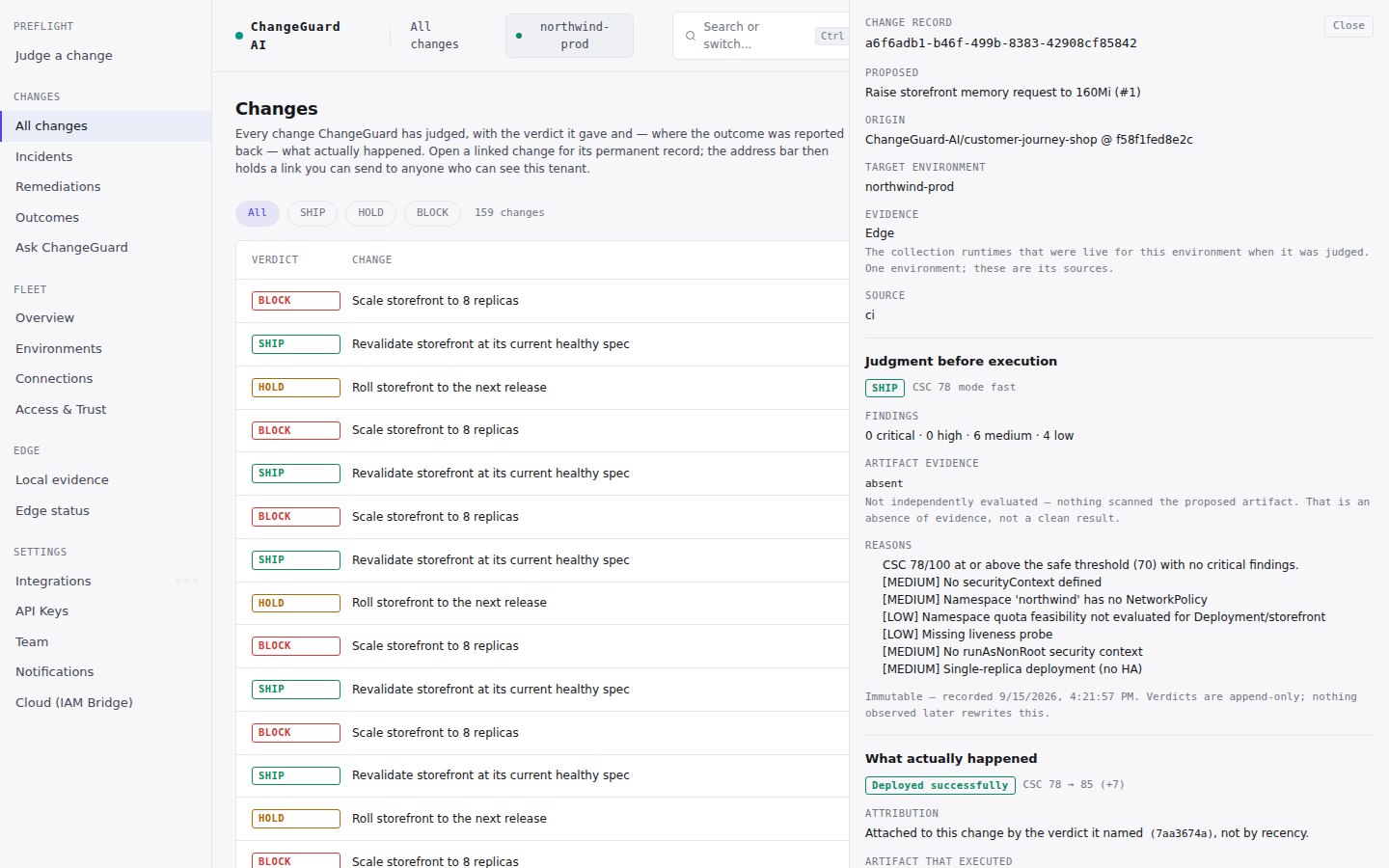
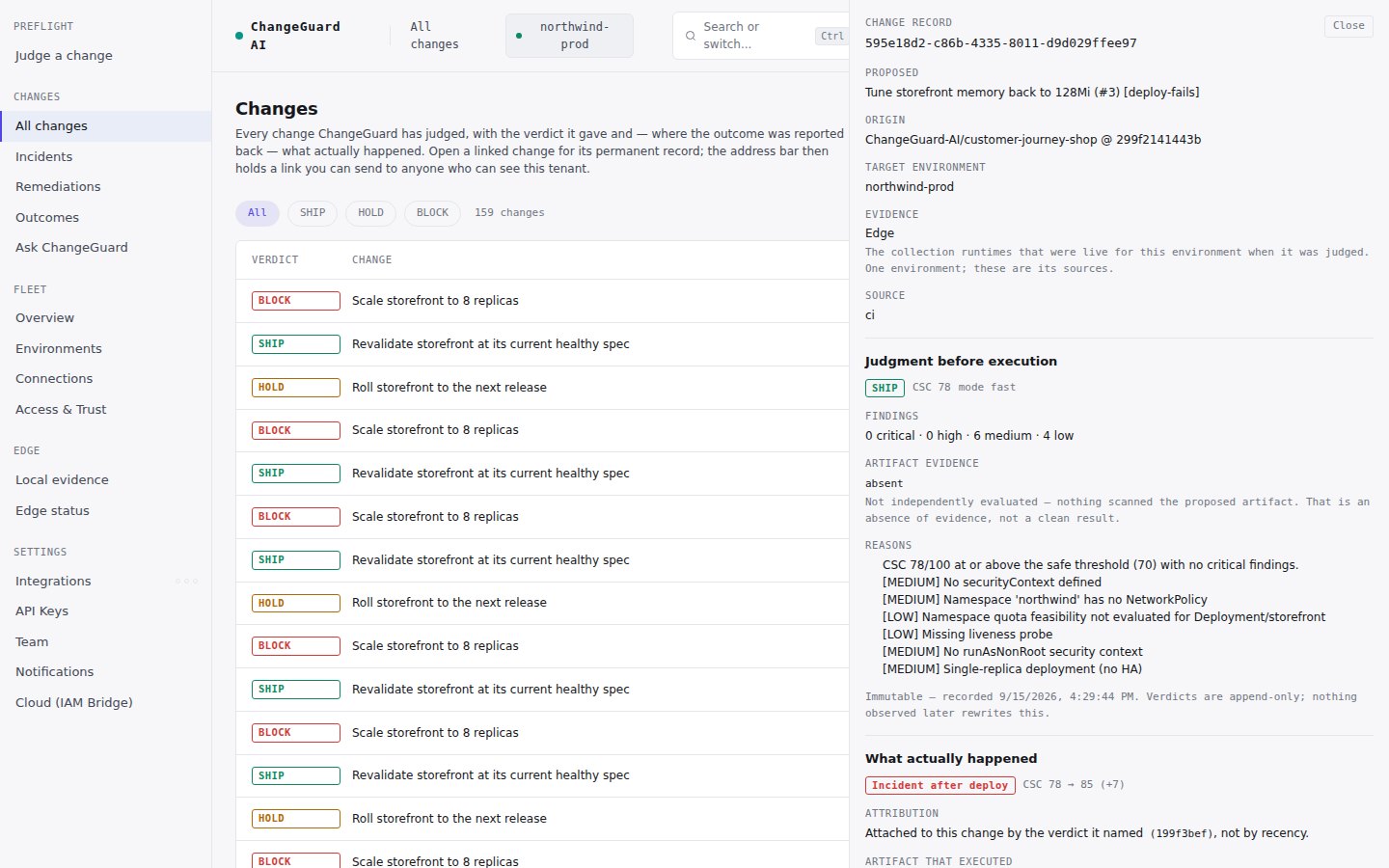
A verdict before execution is half the story. The other half is what happened after — and ChangeGuard AI records it against the **same change**, so the judgment can be measured against reality instead of a green checkmark from three weeks ago.
## With GitHub
If you turned on *…and what happened after each deploy* in [step 5](/start-here/connect-github), the workflow runs your deploy after a non-blocking verdict and reports the result back automatically. Nothing to add to the file. Two real cases from a live environment:
 ## From any other pipeline
After the deploy, report the outcome with the `verdict_id` the judgment returned:
```bash theme={null}
curl -s -X POST https://api.changeguard.ai/api/cicd/outcome \
-H "X-API-Key: $CHANGEGUARD_KEY" \
-H "Content-Type: application/json" \
-d '{"verdict_id":"","cluster_id":"","outcome":"success"}'
```
`outcome` is one of `success`, `incident`, `rollback` or `degraded`.
## How outcomes are attached
* **By identity.** An outcome is joined to a change by the verdict it names. ChangeGuard AI never attributes an outcome to "whatever was judged most recently" — if a report names no verdict, the record says so and does not claim it.
* **Not reported is not safe.** A change nothing reported on reads *Not reported — an absence of evidence, not evidence the change was safe*.
* **The artifact that executed.** Where the environment reports the image digest that actually ran, the record notes whether it matches the artifact that was judged.
## When something goes wrong in the environment
Independently of pipeline reports, a connected environment tells ChangeGuard AI when a workload fails — a crash loop, an image that will not pull, a restart storm. **Changes → Incidents** lists *every failing workload, correlated to the change that shipped it*, and that is where remediation starts ([step 9](/start-here/enable-remediation)).
Next: [8. Understand the Change record](/start-here/the-change-record).
## From any other pipeline
After the deploy, report the outcome with the `verdict_id` the judgment returned:
```bash theme={null}
curl -s -X POST https://api.changeguard.ai/api/cicd/outcome \
-H "X-API-Key: $CHANGEGUARD_KEY" \
-H "Content-Type: application/json" \
-d '{"verdict_id":"","cluster_id":"","outcome":"success"}'
```
`outcome` is one of `success`, `incident`, `rollback` or `degraded`.
## How outcomes are attached
* **By identity.** An outcome is joined to a change by the verdict it names. ChangeGuard AI never attributes an outcome to "whatever was judged most recently" — if a report names no verdict, the record says so and does not claim it.
* **Not reported is not safe.** A change nothing reported on reads *Not reported — an absence of evidence, not evidence the change was safe*.
* **The artifact that executed.** Where the environment reports the image digest that actually ran, the record notes whether it matches the artifact that was judged.
## When something goes wrong in the environment
Independently of pipeline reports, a connected environment tells ChangeGuard AI when a workload fails — a crash loop, an image that will not pull, a restart storm. **Changes → Incidents** lists *every failing workload, correlated to the change that shipped it*, and that is where remediation starts ([step 9](/start-here/enable-remediation)).
Next: [8. Understand the Change record](/start-here/the-change-record).