> ## Documentation Index
> Fetch the complete documentation index at: https://docs.changeguard.ai/llms.txt
> Use this file to discover all available pages before exploring further.
# 6. Judge a real proposed change
> Open a pull request that changes a manifest and watch the actual change get judged against the environment it will enter.
With GitHub connected, every pull request that touches a manifest is judged as the *actual* proposed change — not a description of it. The workflow reads the manifests the pull request changed, sends them to ChangeGuard AI, and ChangeGuard AI judges them against the environment bound to the repository.
Any real change works: a new image tag, a replica count, a resource request. Push the branch and open the pull request.
The **ChangeGuard** check runs within a minute or two. Its run summary carries the verdict and the reasons; the check passes on SHIP and HOLD and fails on BLOCK (unless you set `enforce_block: false`).
**Changes → All changes** shows the new row at the top, with **source** `ci` and the repository and commit under **Origin**. Open it for the full judgment: verdict, every reason, and the evidence it had.
## What a real BLOCK looks like
From a live environment: a pull request that scales a workload to eight replicas. The manifest is valid. Against what is actually running, it would exceed the namespace's memory quota — and the record says exactly by how much.
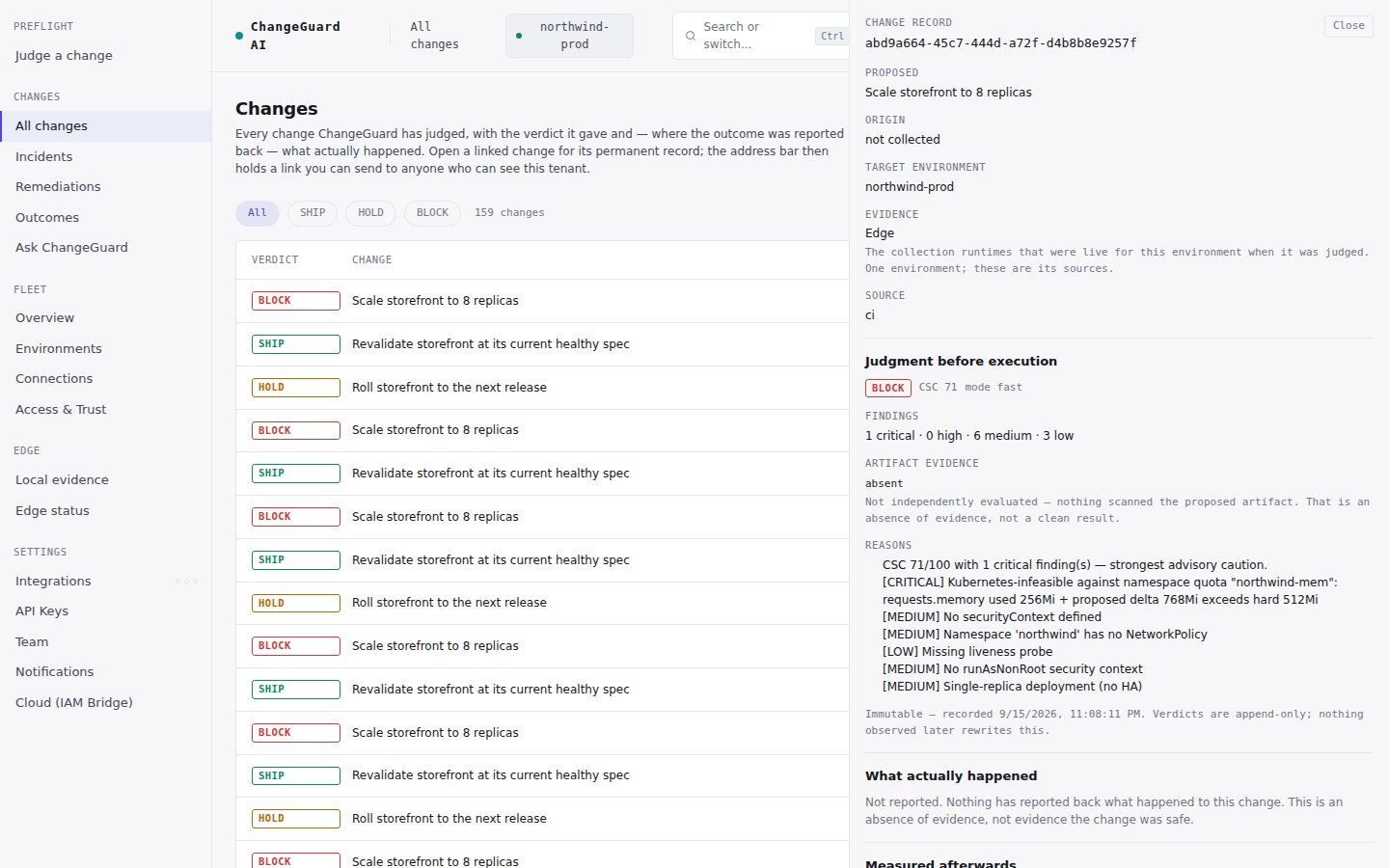 A second kind of BLOCK is a change that is wrong on its own terms in context — for example a container requesting more CPU than its own limit allows, which can never schedule. A linter passes it; a judgment against live state does not.
## What a real SHIP looks like
A change that fits: the same workload at a spec the environment can run. The judgment says *at or above the safe threshold with no critical findings*, lists the non-blocking findings it noticed, and moves on. When the workflow also deploys ([step 7](/start-here/observe-the-outcome)), this is the change that ships.
**HOLD from a pull request** usually means the environment has not reported recently. The record says so: it names the environment and that the judgment was made on the change alone. Check that the environment is still sending data; nothing needs reconnecting.
## Without GitHub
You can judge the actual manifest from any pipeline with one API call ([Use the verdict in CI](/gate-your-pipeline)), or judge a change by hand in Preflight ([step 2](/start-here/first-preflight)). All three paths use the same judgment and write the same kind of record.
Next: [7. Observe the outcome](/start-here/observe-the-outcome).
A second kind of BLOCK is a change that is wrong on its own terms in context — for example a container requesting more CPU than its own limit allows, which can never schedule. A linter passes it; a judgment against live state does not.
## What a real SHIP looks like
A change that fits: the same workload at a spec the environment can run. The judgment says *at or above the safe threshold with no critical findings*, lists the non-blocking findings it noticed, and moves on. When the workflow also deploys ([step 7](/start-here/observe-the-outcome)), this is the change that ships.
**HOLD from a pull request** usually means the environment has not reported recently. The record says so: it names the environment and that the judgment was made on the change alone. Check that the environment is still sending data; nothing needs reconnecting.
## Without GitHub
You can judge the actual manifest from any pipeline with one API call ([Use the verdict in CI](/gate-your-pipeline)), or judge a change by hand in Preflight ([step 2](/start-here/first-preflight)). All three paths use the same judgment and write the same kind of record.
Next: [7. Observe the outcome](/start-here/observe-the-outcome).