> ## Documentation Index
> Fetch the complete documentation index at: https://docs.changeguard.ai/llms.txt
> Use this file to discover all available pages before exploring further.
# 2. Run your first Preflight
> Describe a change, evaluate it, read the verdict. About two minutes, nothing to connect, nothing to install.
Preflight is the front door. It works with nothing connected: no environment, no repository, no install. Sign in and you land on it — in the sidebar it is **Preflight → Judge a change**.
Under **Change**, answer *What is this change?* in plain words — for example `Roll storefront to the next release`.
Under **Artifact**, enter the **Proposed image** (for example `registry.example.com/storefront:2.4.0`). The **Image digest** is optional; when your build gives you one, adding it lets ChangeGuard AI evaluate the exact bytes.
Under **Target**, leave *No environment — judge the change on its own* for now. Once you connect an environment ([step 4](/start-here/connect-an-environment)) it appears here and is preselected, and the judgment is made against that environment's live state.
Press **Evaluate change**. The verdict appears on the right within a second or two.
## Reading the judgment
The **Judgment** card shows the verdict — **SHIP**, **HOLD** or **BLOCK** — a one-line meaning, and a **Why** list with each reason in plain terms. The line *Advisory only — ChangeGuard does not prevent execution* is part of the contract: you decide what to do with the verdict.
The **Evidence** card lists every class of evidence the judgment could have used and whether it was **AVAILABLE**, **NOT AVAILABLE** or **NOT AUTHORIZED** — for example the proposed artifact, the environment's live state, runtime activity, node benchmarks. Its header says the rule out loud: *absent evidence is never counted as safe*.
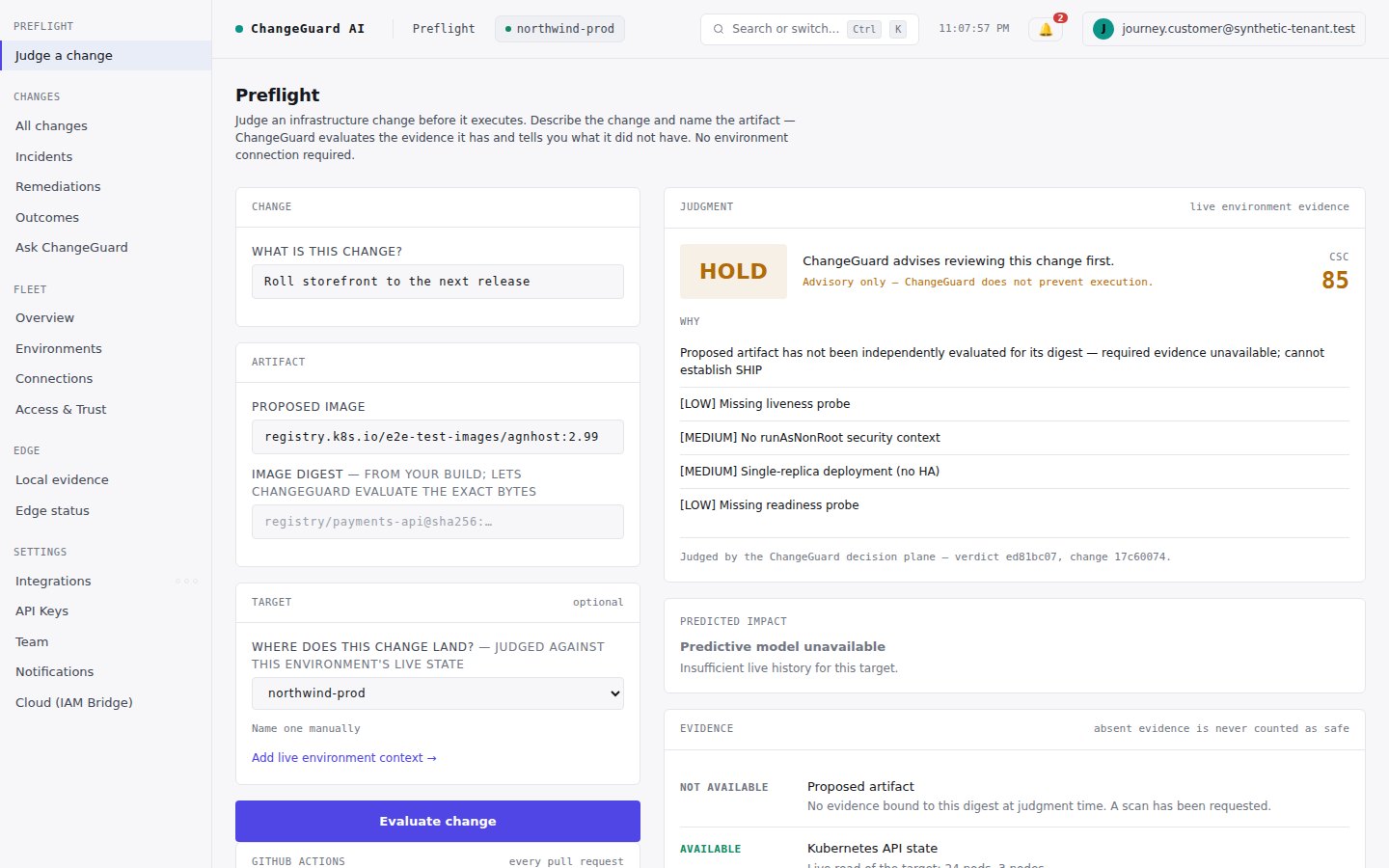 **Expect HOLD the first time.** With nothing connected, ChangeGuard AI has no live environment and has not evaluated the artifact, so it says so and advises a review rather than pretending. That honesty is the product. SHIP and BLOCK come once there is evidence to earn them — the next steps get you there.
Every judgment is recorded. Open **Changes → All changes** and the verdict you just produced is the top row, with a permanent record behind it ([step 8](/start-here/the-change-record)).
Next: [3. Understand SHIP / HOLD / BLOCK](/start-here/ship-hold-block).
**Expect HOLD the first time.** With nothing connected, ChangeGuard AI has no live environment and has not evaluated the artifact, so it says so and advises a review rather than pretending. That honesty is the product. SHIP and BLOCK come once there is evidence to earn them — the next steps get you there.
Every judgment is recorded. Open **Changes → All changes** and the verdict you just produced is the top row, with a permanent record behind it ([step 8](/start-here/the-change-record)).
Next: [3. Understand SHIP / HOLD / BLOCK](/start-here/ship-hold-block).