> ## Documentation Index
> Fetch the complete documentation index at: https://docs.changeguard.ai/llms.txt
> Use this file to discover all available pages before exploring further.
# 9. Optional: enable remediation
> Let ChangeGuard AI propose fixes when a change causes a problem — and grant, per environment, the narrow write access needed to apply them.
Everything so far has been read-only. Remediation is the one place ChangeGuard AI can *act* in an environment, and it is built so that the watching side stays read-only no matter what: acting uses a separate identity, installed by you, with the minimum verbs, scoped to one environment.
Open **Changes → Remediations**. The **Environments** panel at the top explains the model in one line: *Evidence is what ChangeGuard knows. The mode is how much authority you give it — per environment, never account-wide. The executor is whether it can act at all.*
 ## What happens without an executor
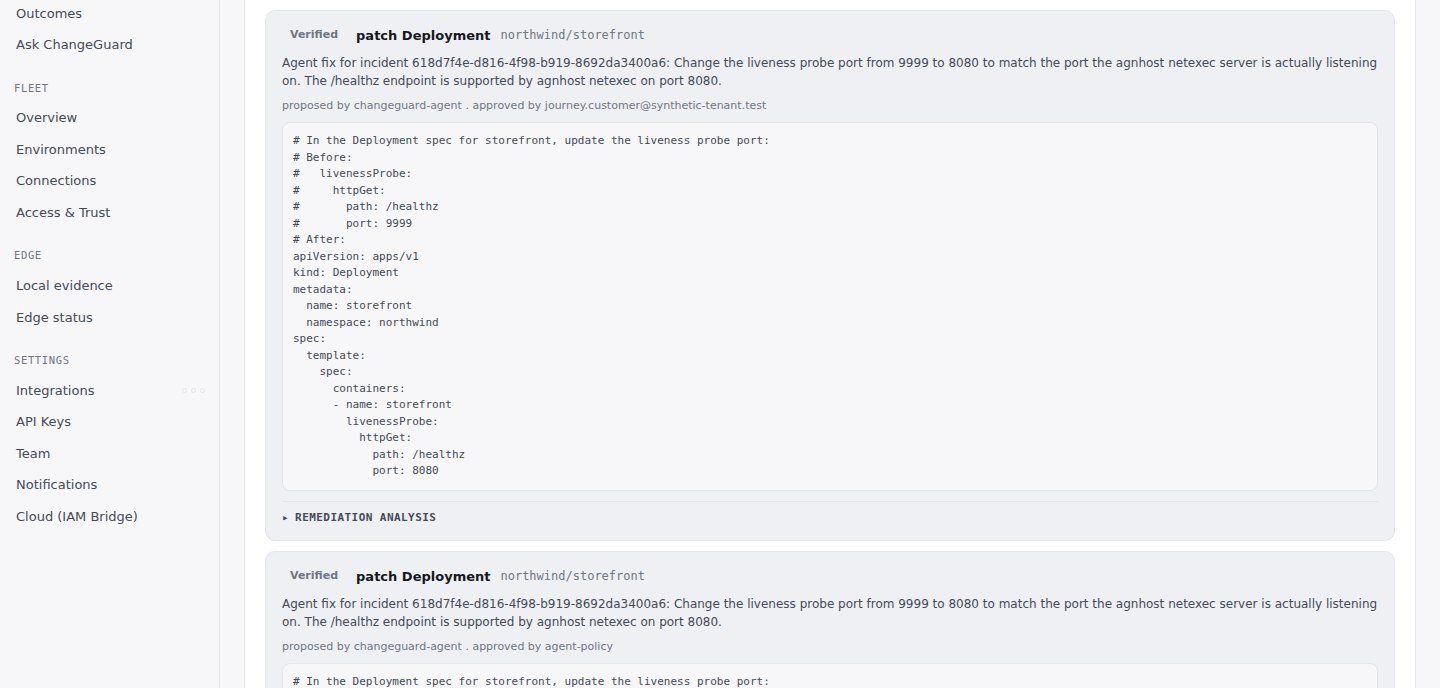
ChangeGuard AI still detects incidents (**Changes → Incidents**: every failing workload, correlated to the change that shipped it), explains them, and proposes a fix with the exact patch. It just cannot apply anything. Many teams run this way for a while.
## Granting the executor (per environment)
In the environment panel, the **Executor** row offers the install for that environment. ChangeGuard AI generates `changeguard-executor.yaml`, a complete manifest that embeds a newly created credential for this environment. It is shown once. You type no internal identifiers — the environment identity is already in the file.
`kubectl apply -f changeguard-executor.yaml` — the one command in this whole path that runs in a terminal, because applying it *is* the grant. Nothing else in ChangeGuard AI can give itself write access.
Within a minute the panel shows **Executor: Ready · heartbeat … ago**. If the heartbeat goes stale, the panel says so and nothing is applied until it returns.
## What the executor may do
* Its **own service account** — the collector that gathers evidence keeps zero write verbs.
* Only `get`, `list` and `patch` on the workloads it is scoped to. No `cluster-admin`, no wildcards, no secrets, no `delete`, no `create`, no `pods/exec`.
* It applies only fixes ChangeGuard AI proposed *and* that were approved by a person (Advise) or allowed by your policy (Auto) — [step 10](/start-here/advise-or-auto).
* Every applied fix is **verified** against real workload health before it is called successful, and every record keeps its approver.
Removing the executor's service account revokes the grant immediately; the evidence side is unaffected.
Deeper: [Policy-governed remediation](/autonomy/overview) · [RBAC boundaries](/autonomy/rbac-boundaries) · [Verification](/autonomy/verification).
Next (optional): [10. Choose Advise or Auto](/start-here/advise-or-auto).
## What happens without an executor
ChangeGuard AI still detects incidents (**Changes → Incidents**: every failing workload, correlated to the change that shipped it), explains them, and proposes a fix with the exact patch. It just cannot apply anything. Many teams run this way for a while.
## Granting the executor (per environment)
In the environment panel, the **Executor** row offers the install for that environment. ChangeGuard AI generates `changeguard-executor.yaml`, a complete manifest that embeds a newly created credential for this environment. It is shown once. You type no internal identifiers — the environment identity is already in the file.
`kubectl apply -f changeguard-executor.yaml` — the one command in this whole path that runs in a terminal, because applying it *is* the grant. Nothing else in ChangeGuard AI can give itself write access.
Within a minute the panel shows **Executor: Ready · heartbeat … ago**. If the heartbeat goes stale, the panel says so and nothing is applied until it returns.
## What the executor may do
* Its **own service account** — the collector that gathers evidence keeps zero write verbs.
* Only `get`, `list` and `patch` on the workloads it is scoped to. No `cluster-admin`, no wildcards, no secrets, no `delete`, no `create`, no `pods/exec`.
* It applies only fixes ChangeGuard AI proposed *and* that were approved by a person (Advise) or allowed by your policy (Auto) — [step 10](/start-here/advise-or-auto).
* Every applied fix is **verified** against real workload health before it is called successful, and every record keeps its approver.
Removing the executor's service account revokes the grant immediately; the evidence side is unaffected.
Deeper: [Policy-governed remediation](/autonomy/overview) · [RBAC boundaries](/autonomy/rbac-boundaries) · [Verification](/autonomy/verification).
Next (optional): [10. Choose Advise or Auto](/start-here/advise-or-auto).