> ## Documentation Index
> Fetch the complete documentation index at: https://docs.changeguard.ai/llms.txt
> Use this file to discover all available pages before exploring further.
# 10. Optional: choose Advise or Auto
> Decide, per environment, whether a person approves each fix or ChangeGuard AI acts within a policy you wrote.
Authority is a per-environment setting on **Changes → Remediations**, in the environment panel's **Mode** toggle. It is never account-wide, and it does nothing at all until an executor is installed ([step 9](/start-here/enable-remediation)).
## Advise (the default)
*ChangeGuard proposes fixes and waits for a human to approve each one.*
When an incident is detected, ChangeGuard AI proposes a fix — the exact patch, with the reasoning — and it appears at the top of the Remediations list as **Awaiting approval** with **Approve** and **Reject** buttons. Approving requires an operator, admin or owner. After approval the executor applies the patch and ChangeGuard AI verifies recovery against real workload health; the record then reads **Verified**, *proposed by changeguard-agent · approved by ‹your email›*. Rejecting keeps the record too, with the reason.
## Auto (opt-in)
ChangeGuard AI applies fixes itself — but only inside an explicit **execution policy**, and never outside it. The policy lives on **Changes → Incidents** under *Agent autonomy → Execution policy (Auto mode)*:
| Field | What it bounds |
| ------------------ | ------------------------------------------------------------ |
| **Namespaces** | Where Auto may act at all. |
| **Fix types** | Which kinds of fix (for example manifest patches). |
| **Min confidence** | The floor below which a fix is only proposed, never applied. |
| **Max / hour** | A cap on automatic actions. |
The product refuses to act on an incomplete policy: *Nothing auto-executes — Auto mode requires a complete policy (namespaces, fix types, confidence floor, hourly cap).* A fix applied under Auto records *approved by agent-policy* so the history says who decided.
## Either way
* Every applied fix is **verified** before it is called successful; a failed verification is rolled back exactly once and handed to a human.
* Every record keeps **mode at execution** and **approver**, permanently.
* The watching side stays read-only; only the executor you installed can write, only where you scoped it.
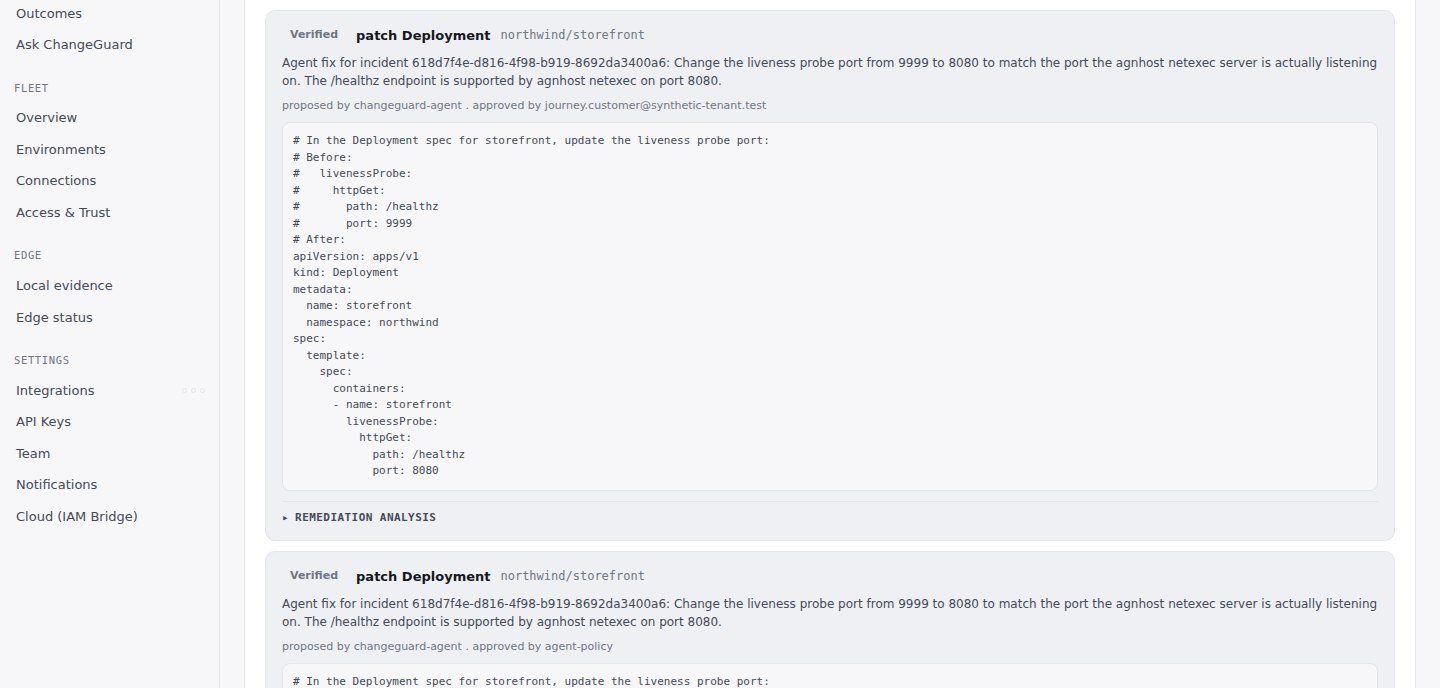 That is the whole path: a change proposed, judged against its environment, shipped or stopped, observed, fixed if needed, and remembered. From here, the rest of the documentation goes deeper on each part.
Deeper: [Autonomy model](/autonomy/autonomy-model) · [Execution policy](/autonomy/execution-policy) · [Compensating actions](/autonomy/compensating-actions) · [Audit trail](/autonomy/audit-trail).
That is the whole path: a change proposed, judged against its environment, shipped or stopped, observed, fixed if needed, and remembered. From here, the rest of the documentation goes deeper on each part.
Deeper: [Autonomy model](/autonomy/autonomy-model) · [Execution policy](/autonomy/execution-policy) · [Compensating actions](/autonomy/compensating-actions) · [Audit trail](/autonomy/audit-trail).