> ## Documentation Index
> Fetch the complete documentation index at: https://docs.changeguard.ai/llms.txt
> Use this file to discover all available pages before exploring further.
# Connected Environments
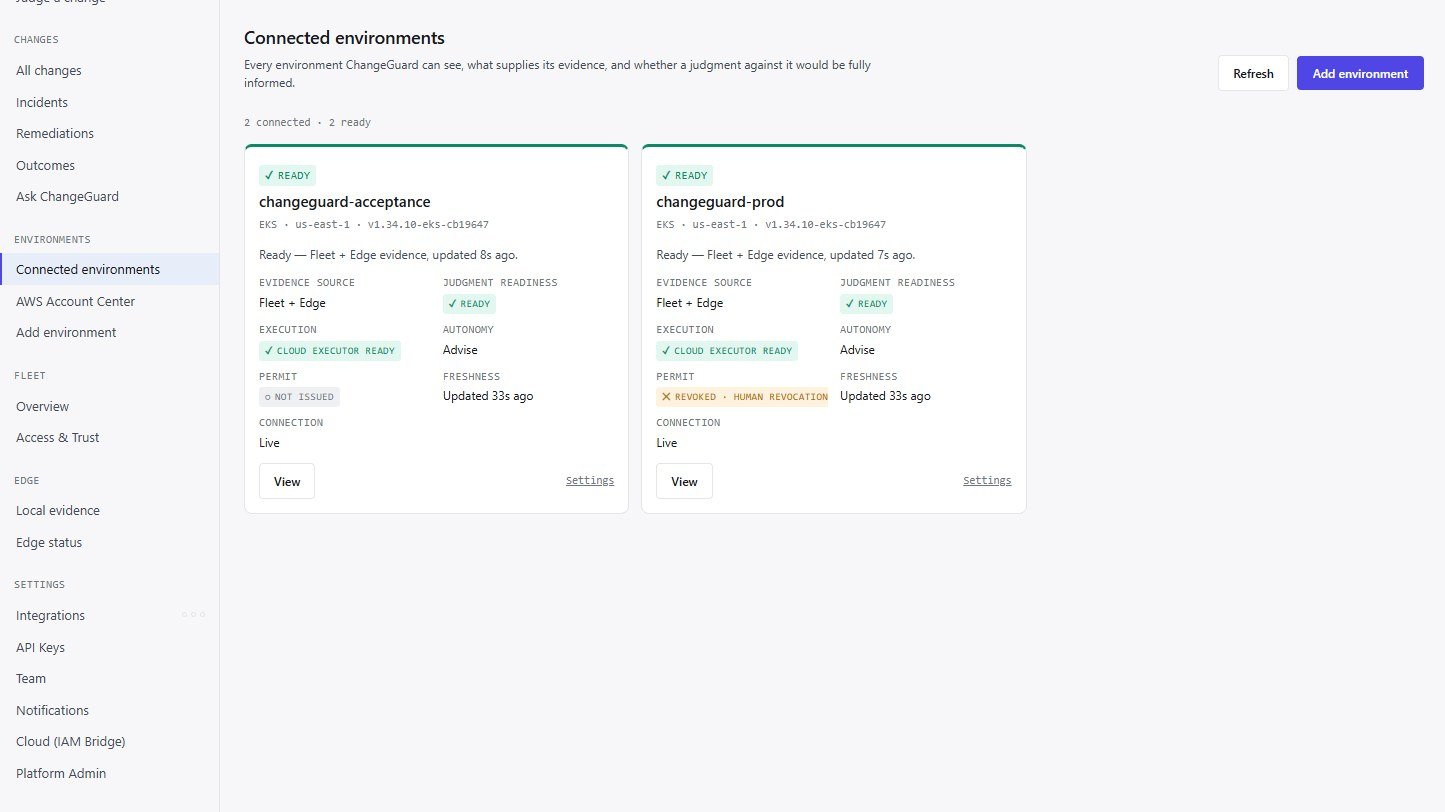
> Every environment ChangeGuard can see, what supplies its evidence, whether a judgment would be fully informed, its execution readiness, its latest Permit and its Advise/Auto mode — connect, authorize, verify, operate, repair, retire.
**Status: Live.** Connected Environments is the one place environments are added, authorized, verified, repaired and retired. It is a product layer over one canonical environment identity — the same cluster reported by Fleet and by Edge is one environment, never two.
Open **Environments → Connected environments**. Each card is one environment, with:
| Field | What it tells you |
| - | - |
| **Status** | Ready · Connecting · Authorization required · Evidence stale · Edge disconnected · Fleet authorization expired · Fleet unreachable · Executor unavailable · Attention required · Retired — always as text plus an icon, never color alone |
| **Evidence source** | Fleet (centralized, read-only), Edge (optional in-cluster collector), or Fleet + Edge |
| **Judgment readiness** | Ready · Partial evidence · Stale evidence · No evidence — *connected* is not the same as *fully informed*, so this is reported separately |
| **Execution** | Not enabled · Verify access · Cloud Executor Ready · Local Executor ready · Needs attention · Permits unavailable · Upgrade required |
| **Permit** | The environment's latest Permit: Not issued · Authorized · expires in … · Consumed (with its outcome) · Expired · Revoked · reason |
| **Autonomy** | Advise (default) or Auto |
| **Freshness** | When evidence last arrived, against the 5-minute staleness bound and the 15-minute judgment bound |
 ## Flows
```text theme={null}
CONNECT → DISCOVER → SELECT → AUTHORIZE → VERIFY, then OPERATE, REPAIR, RETIRE
```
* **AWS / EKS (Fleet, recommended).** Connect the account once in [AWS Account Center](/connect/aws-account-center) → **Environments → Add environment → AWS / EKS** discovers every EKS cluster in the authorized regions → select → **Authorize selected** registers them → apply the generated read-only grant with your own credentials → **Verify** until the first evidence arrives (typically within a minute). Discovery never enrolls anything.
* **Kubernetes (Edge).** **Add environment → Kubernetes**: name the environment → **Authorize** enrolls it → apply the generated install (the environment's credential is embedded; nothing is typed) → **Verify**. See [Fleet, Edge and the Executor](/connect/fleet-edge-executor).
* **Edge as an extension.** For an environment Fleet already reads, add Edge to the same card; the canonical merge keeps one environment with provenance *Fleet + Edge*.
Repair actions are guided — what happened, what it affects, what to do next — and never widen authority: **Verify** re-checks; **Reconnect** re-activates the environment's own identities; **Reauthorize** re-runs the authorization step; **Retire** revokes authorization and removes the environment from the active list while keeping change history, verdicts, outcomes, incidents, remediations, score history and audit.
## Evidence, judgment readiness and execution are three different things
* **Evidence** is what ChangeGuard knows — read-only, from Fleet, Edge or both.
* **Judgment readiness** says whether a judgment against this environment would be fully informed right now. Evidence past the 15-minute bound is treated as absent by a judgment, never as current.
* **Execution** is whether ChangeGuard *can act* here at all — a separately enabled, separately identified path proven by **Verify execution access** — and the latest [Permit](/govern/permit) shows what, if anything, is currently authorized. Read authority never implies write authority; nothing executes without a Permit.
## The environment page
Open any environment for its full view: overview, connection (Fleet, Edge, the AWS account it reads through, and *Advanced: identities behind this environment*), evidence, judgment readiness, **Execution** (set up the [Cloud Executor](/execute/cloud-executor) or install the [Local Executor](/execute/local-executor), verify execution access, change namespaces, disable execution, recent Permits), **Autonomy** ([Advise or Auto](/autonomy/autonomy-model) and the execution policy), recent changes, incidents and remediations, and settings.
## What never changes underneath
Connected Environments adds no second registry, no second identity system and no second judgment path. A retired environment is registry-authoritative on every replica at once; reconnecting it re-activates exactly the identities retirement revoked; duplicate registrations of one EKS cluster consolidate into one environment; and a Fleet identity that has never read its cluster and is refused by the Kubernetes API is reported as *read access not granted*, with the grant instructions — not as *unreachable*.
This documentation is built and hosted on [Mintlify](https://mintlify.com), a developer documentation platform.
## Flows
```text theme={null}
CONNECT → DISCOVER → SELECT → AUTHORIZE → VERIFY, then OPERATE, REPAIR, RETIRE
```
* **AWS / EKS (Fleet, recommended).** Connect the account once in [AWS Account Center](/connect/aws-account-center) → **Environments → Add environment → AWS / EKS** discovers every EKS cluster in the authorized regions → select → **Authorize selected** registers them → apply the generated read-only grant with your own credentials → **Verify** until the first evidence arrives (typically within a minute). Discovery never enrolls anything.
* **Kubernetes (Edge).** **Add environment → Kubernetes**: name the environment → **Authorize** enrolls it → apply the generated install (the environment's credential is embedded; nothing is typed) → **Verify**. See [Fleet, Edge and the Executor](/connect/fleet-edge-executor).
* **Edge as an extension.** For an environment Fleet already reads, add Edge to the same card; the canonical merge keeps one environment with provenance *Fleet + Edge*.
Repair actions are guided — what happened, what it affects, what to do next — and never widen authority: **Verify** re-checks; **Reconnect** re-activates the environment's own identities; **Reauthorize** re-runs the authorization step; **Retire** revokes authorization and removes the environment from the active list while keeping change history, verdicts, outcomes, incidents, remediations, score history and audit.
## Evidence, judgment readiness and execution are three different things
* **Evidence** is what ChangeGuard knows — read-only, from Fleet, Edge or both.
* **Judgment readiness** says whether a judgment against this environment would be fully informed right now. Evidence past the 15-minute bound is treated as absent by a judgment, never as current.
* **Execution** is whether ChangeGuard *can act* here at all — a separately enabled, separately identified path proven by **Verify execution access** — and the latest [Permit](/govern/permit) shows what, if anything, is currently authorized. Read authority never implies write authority; nothing executes without a Permit.
## The environment page
Open any environment for its full view: overview, connection (Fleet, Edge, the AWS account it reads through, and *Advanced: identities behind this environment*), evidence, judgment readiness, **Execution** (set up the [Cloud Executor](/execute/cloud-executor) or install the [Local Executor](/execute/local-executor), verify execution access, change namespaces, disable execution, recent Permits), **Autonomy** ([Advise or Auto](/autonomy/autonomy-model) and the execution policy), recent changes, incidents and remediations, and settings.
## What never changes underneath
Connected Environments adds no second registry, no second identity system and no second judgment path. A retired environment is registry-authoritative on every replica at once; reconnecting it re-activates exactly the identities retirement revoked; duplicate registrations of one EKS cluster consolidate into one environment; and a Fleet identity that has never read its cluster and is refused by the Kubernetes API is reported as *read access not granted*, with the grant instructions — not as *unreachable*.
This documentation is built and hosted on [Mintlify](https://mintlify.com), a developer documentation platform.