> ## Documentation Index
> Fetch the complete documentation index at: https://docs.changeguard.ai/llms.txt
> Use this file to discover all available pages before exploring further.
# AWS Account Center
> Which AWS accounts ChangeGuard is connected to, and whether each connection is healthy enough to discover and read your EKS environments. Connect, don't configure; verify, don't guess.
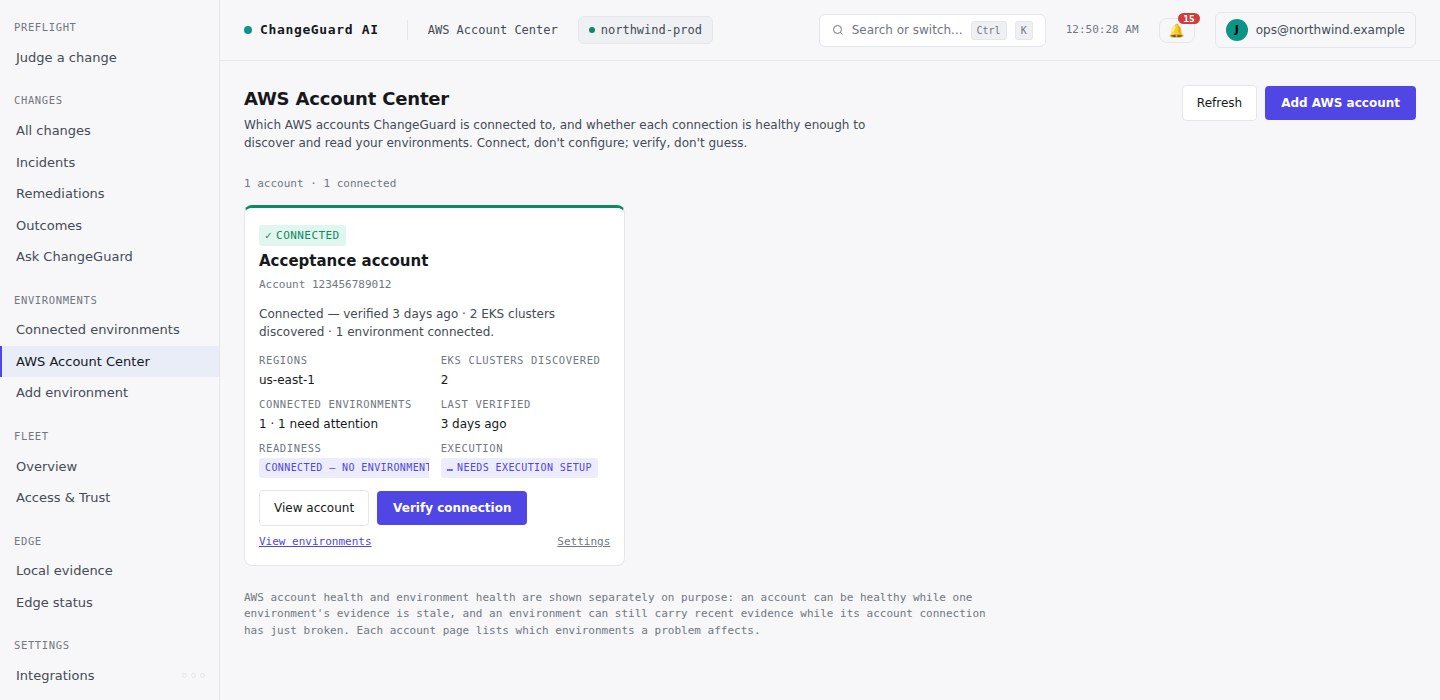
**Status: Live.** AWS Account Center is the AWS-side companion to [Connected Environments](/connect/connected-environments): *Connected Environments* answers which environments ChangeGuard manages; *AWS Account Center* answers which AWS accounts it is connected to and whether those connections are healthy.
```text theme={null}
SIGN IN → CONNECT AWS → VERIFY → DISCOVER EKS → SELECT → AUTHORIZE → READY
```
Open **Environments → AWS Account Center**. Each account card shows its status in customer words, what it affects, and the one action that fixes it. You never need raw IAM failure modes, external IDs, role assumptions or integration state unless you open *View technical details*.
 ## Connect an account
Choose **Add AWS account**: name the account, create one IAM role in your account from the trust material ChangeGuard shows you (CloudFormation, Terraform or CLI — or paste the ARN of a role you already created), verify the connection, then discover EKS clusters. Two properties make the role safe:
* its only permissions are `eks:ListClusters` and `eks:DescribeCluster` — discovery, nothing else;
* its trust policy admits only ChangeGuard's principal **with a unique external ID ChangeGuard issues**. ChangeGuard never accepts an external ID from a caller, so nobody else can have your role assumed.
Connecting an account grants no Kubernetes access to anything. Discovery is not enrollment, and authorization is a separate, per-cluster grant you make yourself — from **Environments → Add environment → AWS / EKS**, or from the account's own page.
## Verify
**Verify connection** runs real, read-only checks in order — the stored connection, the external ID and trust principals, STS AssumeRole, the assumed identity's account, `eks:ListClusters` in every authorized region, discovery, `eks:DescribeCluster` on every cluster you authorized, the health of the environments this account backs, and whether fresh Fleet evidence is arriving. Nothing on your side is mutated and authority is never widened. The result is recorded on the connection and audited.
| Status | Meaning | Primary action |
| - | - | - |
| **Not verified yet** | Connected in ChangeGuard, never verified (the role may not exist yet) | Verify connection |
| **Connected** | AssumeRole, identity, regions and discovery all healthy | Discover / View account |
| **Partially available** | The role works but some regions or clusters do not | Verify (shows which) |
| **Needs attention** | The role works but cannot discover, the identity does not match, or AWS is throttling | Repair access / Retry |
| **Reauthorization required** | ChangeGuard can no longer assume the role (trust policy, external ID or the role itself) | Reauthorize |
| **Disconnected** | AWS could not be reached, or ChangeGuard's own credentials failed — your configuration may still be valid | Retry |
| **No EKS found** | Healthy, discovery ran, nothing found in the authorized regions | Adjust regions / Verify |
Every non-healthy state carries four sentences: what happened, what it affects, what to do next, and the action. The raw AWS detail stays behind *View technical details*.
**Account health ≠ environment health.** An account's status comes from its own verification, never from environment status. The account page lists which environments are *affected* by an account problem (they depend on Fleet through this role and have no fresh Edge evidence) and which are *unaffected* (Edge evidence continues).
## Discover, select, authorize
**Discover** lists the EKS clusters the role can see in your authorized regions; **Detect regions** probes every commercial region with your role and reports where it works, where the region is not enabled, and where clusters were found — you decide which regions to keep. Select the clusters ChangeGuard may observe and **Authorize selected**: ChangeGuard generates the exact per-cluster read-only grant (an EKS access entry plus a `get`/`list` role binding, no `watch`, no writes, no wildcards, no Secret access requested) for you to apply with your own credentials. Re-authorizing a cluster you previously retired re-activates its original environment rather than minting a second one.
## Reauthorize and repair
Reauthorize never creates a second connection: same row, same account identity, same environments, same history. It re-presents the trust material for you to re-apply and then verifies. If you choose to issue a new external ID, every environment registered under the old one moves to the new one in the same transaction, so nothing is stranded.
## Execution readiness
An account's page also shows whether execution is set up for the environments it backs. Execution is a separate authority with its own per-environment role that carries **no AWS permissions** — see [Cloud Executor](/execute/cloud-executor). Nothing about connecting an account grants ChangeGuard the ability to act.
## Credentials
Every AWS session is minted per operation with STS AssumeRole and the external ID, and expires on its own (15 minutes). No long-lived customer keys are accepted or stored anywhere; the stored record is non-secret configuration (role ARN, external ID, regions). Many accounts per tenant is the normal model — one connection per role ARN.
This documentation is built and hosted on [Mintlify](https://mintlify.com), a developer documentation platform.
## Connect an account
Choose **Add AWS account**: name the account, create one IAM role in your account from the trust material ChangeGuard shows you (CloudFormation, Terraform or CLI — or paste the ARN of a role you already created), verify the connection, then discover EKS clusters. Two properties make the role safe:
* its only permissions are `eks:ListClusters` and `eks:DescribeCluster` — discovery, nothing else;
* its trust policy admits only ChangeGuard's principal **with a unique external ID ChangeGuard issues**. ChangeGuard never accepts an external ID from a caller, so nobody else can have your role assumed.
Connecting an account grants no Kubernetes access to anything. Discovery is not enrollment, and authorization is a separate, per-cluster grant you make yourself — from **Environments → Add environment → AWS / EKS**, or from the account's own page.
## Verify
**Verify connection** runs real, read-only checks in order — the stored connection, the external ID and trust principals, STS AssumeRole, the assumed identity's account, `eks:ListClusters` in every authorized region, discovery, `eks:DescribeCluster` on every cluster you authorized, the health of the environments this account backs, and whether fresh Fleet evidence is arriving. Nothing on your side is mutated and authority is never widened. The result is recorded on the connection and audited.
| Status | Meaning | Primary action |
| - | - | - |
| **Not verified yet** | Connected in ChangeGuard, never verified (the role may not exist yet) | Verify connection |
| **Connected** | AssumeRole, identity, regions and discovery all healthy | Discover / View account |
| **Partially available** | The role works but some regions or clusters do not | Verify (shows which) |
| **Needs attention** | The role works but cannot discover, the identity does not match, or AWS is throttling | Repair access / Retry |
| **Reauthorization required** | ChangeGuard can no longer assume the role (trust policy, external ID or the role itself) | Reauthorize |
| **Disconnected** | AWS could not be reached, or ChangeGuard's own credentials failed — your configuration may still be valid | Retry |
| **No EKS found** | Healthy, discovery ran, nothing found in the authorized regions | Adjust regions / Verify |
Every non-healthy state carries four sentences: what happened, what it affects, what to do next, and the action. The raw AWS detail stays behind *View technical details*.
**Account health ≠ environment health.** An account's status comes from its own verification, never from environment status. The account page lists which environments are *affected* by an account problem (they depend on Fleet through this role and have no fresh Edge evidence) and which are *unaffected* (Edge evidence continues).
## Discover, select, authorize
**Discover** lists the EKS clusters the role can see in your authorized regions; **Detect regions** probes every commercial region with your role and reports where it works, where the region is not enabled, and where clusters were found — you decide which regions to keep. Select the clusters ChangeGuard may observe and **Authorize selected**: ChangeGuard generates the exact per-cluster read-only grant (an EKS access entry plus a `get`/`list` role binding, no `watch`, no writes, no wildcards, no Secret access requested) for you to apply with your own credentials. Re-authorizing a cluster you previously retired re-activates its original environment rather than minting a second one.
## Reauthorize and repair
Reauthorize never creates a second connection: same row, same account identity, same environments, same history. It re-presents the trust material for you to re-apply and then verifies. If you choose to issue a new external ID, every environment registered under the old one moves to the new one in the same transaction, so nothing is stranded.
## Execution readiness
An account's page also shows whether execution is set up for the environments it backs. Execution is a separate authority with its own per-environment role that carries **no AWS permissions** — see [Cloud Executor](/execute/cloud-executor). Nothing about connecting an account grants ChangeGuard the ability to act.
## Credentials
Every AWS session is minted per operation with STS AssumeRole and the external ID, and expires on its own (15 minutes). No long-lived customer keys are accepted or stored anywhere; the stored record is non-secret configuration (role ARN, external ID, regions). Many accounts per tenant is the normal model — one connection per role ARN.
This documentation is built and hosted on [Mintlify](https://mintlify.com), a developer documentation platform.